
Facebook CAPI
Generating Facebook CAPI token
You can find your Facebook CAPI token in Events Manager by going to the Settings tab of your pixel, scrolling to the Conversions API section, and clicking Generate access token.
Step-by-step guide to finding your token:
- Go to Facebook Events Manager.
- Select the data source (your pixel) you want to use from the left navigation menu.
- Click on the Settings tab.
- Scroll down to the Conversions API section.
- Click on the Generate access token link.
- A new access token will appear. Copy this token and use it in your integration.
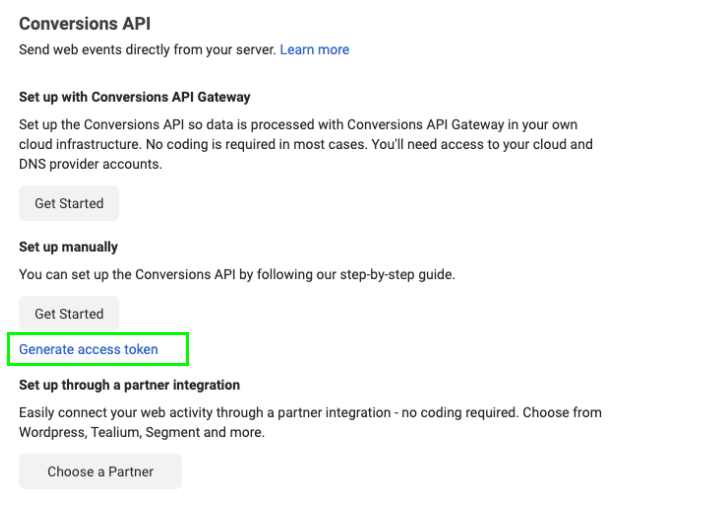
META conversion API implementation for your campaign
Go to your campaign settings and open the Analytics & Tracking tab. Enable Conversion API, add your token, and use CAPI to get more data for your advertising.

*When you implement both the Facebook Pixel and the Conversion API at the same time, the data is sent directly from the server, so the Pixel is effectively overridden.
Marketing integration events
For our community and beyond accessing your project through the web, we trigger the following events based on page visits or user actions:
|
|
User action | Meta Conversions API |
| Project page | User views a project page on the web or in mobile apps | ViewContent |
| Follow | User follows a project (from any location, e.g. project page or homepage) | AddToWishlist |
| Rewards | User adds any product to their cart (reward, add-on, or tip) | AddToCart |
| Checkout | User enters the checkout flow from a project (via any CTA leading to checkout) | InitiateCheckout |
| Conversion | User successfully backed a project and lands on the 'thank you page' | Purchase |